Mačji svet Nasveti

Kako pravilno čistimo mačje stranišče? (po korakih)

stock.adobe.com

Mnoga gospodinjstva z mačko, sploh poleti doma zaznavajo vonj mačjega urina.

A dobra novica je, da lahko s pravilnim čiščenjem dosežemo, da tega vonja doma ne bo – to pa bo dobro delo tudi mački ali mačkam, ki so izredno čiste živali in skrbijo za brezhibno higieno.

Če ima njihovo stranišče premočan vonj, se lahko zgodi, da začnejo zaradi tega svojo potrebo opravljati kje drugje.

Vzrok sicer lahko tiči tudi v bolezni, najpogosteje urinarnega trakta. Preberite več…

Kaj potrebujemo za čiščenje mačjega stranišča?

  • Lopatka z rešetko za vsakdanje čiščenje
  • Vrečka za iztrebke
  • Pesek za mačje stranišče
  • Soda bikarbona
  • Alkoholni kis
  • Ščetka za čiščenje ali gobica, krpa
  • Detergent za posodo
  • Papirnate brisačke

Čiščenje mačjega stranišča po korakih

1. Poberite iztrebke

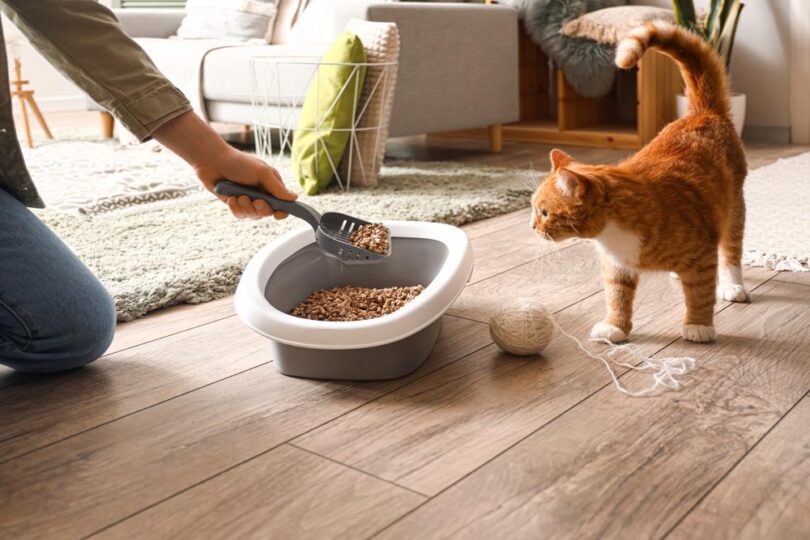
To morate početi vsak dan ali, idealno zjutraj in zvečer. Pospravite kepice lulanja in kakanje v vrečko za smeti, ki jo zavežete in odvržete v črn zabojnik. Pri tem tudi vodite nadzor nad količino lulanja in morebitnimi spremembami pri lulanju ali kakanju.

Pesek dosujte enkrat na dan ali na 2 dni. Po vrhu potresite malo sode bikarbone, ki nase veže vonjave in je neškodljiva.

2. Operite stranišče

Vsake toliko časa, idealno pa vsaj poleti enkrat na teden, stranišče temeljito očistite stranišče. Če je pesek še dokaj čist, ga lahko pretresete v vrečko in ponovno uporabite, enkrat na mesec pa ga zavrzite.

Celo stranišče – pri pokritih tudi stranice in streho – namočite v vroči vodi.

Dodate lahko malo detergenta za posodo, če je treba stranišče bolj razkužiti (po kakšnih infekcijah ali prebavnih težavah) pa dodajte še alkoholni kis. Po namakanju celo površino zdrgnite s ščetko ali gobico ter dobro splaknite.

3. Posušite in napolnite

Stranišče posušite s staro brisačo ali papirnatimi brisačkami. Ko je popolnoma suho, po dnu potresite sodo bikarbono, nato pa dodajte svež pesek.

Če vaša mačka ne mara v pesek, kjer ni njenega vonja, dodajte vsaj malo starega peska in zmešajte, razen če gre za zdravstveno tveganje.

Dodatni nasveti glede mačjega stranišča

  • V nosečnosti se mnoge ženske odrečejo mačkam zaradi potencialne okužbe s toksoplazmozo. A potrebno je le malo več pazljivosti – morda lahko skrb za mačje stranišče prevzame druga oseba v gospodinjstvu – ali pa imejte pri čiščenju na sebi vedno rokavice in masko.

  • Poiščite pesek, ki ustreza vaši mački. Pozanimajte se o sestavi in opazujte svojo mačko. Če se odločite za menjavo vrste peska, ga uvajajte postopoma – tako da ga sprva vmešavate v starega.

  • Splošno pravilo je 1 mačje stranišče na mačko + 1 dodatno. Torej, 3 stranišča za 2 mački.

  • Izogibajte se dišavam – nekatere so za mačke strupene, vse pa jim na dolgi rok škodujejo.

  • Nikoli ne čistite mačjega stranišča z agresivnimi čistili. Če ne gre drugače, raje kupite novo stranišče.

Center Nastavitev Zasebnosti

Obvezni piškotki

Shranijo uporabnikovo odločitev glede sprejemanja piškotkov.

gdpr[allowed_cookies], gdpr[consent_types]: beleži uporabniško odločitev glede sprejetja ali zavrnitev uporabe piškotkov. Veljavnost: 1 leto.

Socialna omrežja

Facebook vtičnik; za povečanje sodelovanja naših uporabnikov preko družbenih omrežij, analizo prodaje, segmentacijo uporabnikov in ponovno targetiranje uporabnikov

_fbp, datr, fr, locale, sb, wd

Analitika

Analitika nam omogoča, da merimo število uporabnikov.

_ga: merjenje obiskanosti s storitvijo Google Analytics. Veljavnost: 2 leti. _gat: piškotek ne hrani uporabniških podatkov, uporablja se za omejevanje pogostosti zadetkov pri merjenju obiskanosti strani s storitvijo Google Analytics. Veljavnost: 10 minut. _gid: naključno ustvarjeno unikatno število se uporablja za izračun podatkov o obisku našega spletnega mesta. s storitvijo Google Analytics. Veljavnost: 24 ur.

Analiza obiska

To function properly, Hotjar stores first-party cookies on your visitor's browser. Cookies are either set by the Hotjar script, or by visiting Hotjar's website. Displaying the correct content to your visitors without personally identifying anyone relies on Hotjar's cookies.

_hjClosedSurveyInvites Hotjar cookie. This cookie is set once a visitor interacts with a Survey invitation modal popup. It is used to ensure that the same invite does not re-appear if it has already been shown. 365 days _hjDonePolls Hotjar cookie. This cookie is set once a visitor completes a poll using the Feedback Poll widget. It is used to ensure that the same poll does not re-appear if it has already been filled in. 365 days _hjMinimizedPolls Hotjar cookie. This cookie is set once a visitor minimizes a Feedback Poll widget. It is used to ensure that the widget stays minimizes when the visitor navigates through your site. 365 days _hjDoneTestersWidgets Hotjar cookie. This cookie is set once a visitor submits their information in the Recruit User Testers widget. It is used to ensure that the same form does not re-appear if it has already been filled in. 365 days _hjIncludedInSample Hotjar cookie. This session cookie is set to let Hotjar know whether that visitor is included in the sample which is used to generate funnels. 365 days _hjShownFeedbackMessage This cookie is set when a visitor minimizes or completes Incoming Feedback. This is done so that the Incoming Feedback will load as minimized immediately if they navigate to another page where it is set to show. 365 days _hjid Hotjar cookie. This cookie is set when the customer first lands on a page with the Hotjar script. It is used to persist the Hotjar User ID, unique to that site on the browser. This ensures that behavior in subsequent visits to the same site will be attributed to the same user ID. 365 days _hjRecordingLastActivity This should be found in sessionStorage (as opposed to cookies). This gets updated when a visitor recording starts and when data is sent through the WebSocket (the visitor performs an action that Hotjar records). Session hjTLDTest When the Hotjar script executes we try to determine the most generic cookie path we should use, instead of the page hostname. This is done so that cookies can be shared across subdomains (where applicable). To determine this, we try to store the _hjTLDTest cookie for different URL substring alternatives until it fails. After this check, the cookie is removed. Session _hjUserAttributesHash User Attributes sent through the Hotjar Identify API are cached for the duration of the session in order to know when an attribute has changed and needs to be updated. Session _hjCachedUserAttributes This cookie stores User Attributes which are sent through the Hotjar Identify API, whenever the user is not in the sample. These attributes will only be saved if the user interacts with a Hotjar Feedback tool. Session _hjLocalStorageTest This cookie is used to check if the Hotjar Tracking Script can use local storage. If it can, a value of 1 is set in this cookie. The data stored in_hjLocalStorageTest has no expiration time, but it is deleted immediately after creating it so the expected storage time is under 100ms. N/A _hjptid This cookie is set for logged in users of Hotjar, who have Admin Team Member permissions. It is used during pricing experiments to show the Admin consistent pricing across the site. Session _hjAbsoluteSessionInProgress The cookie is set so Hotjar can track the beginning of the user's journey for a total session count. It does not contain any identifiable information. 30 minutes

error: Kopiranje teksta ni mogoče.